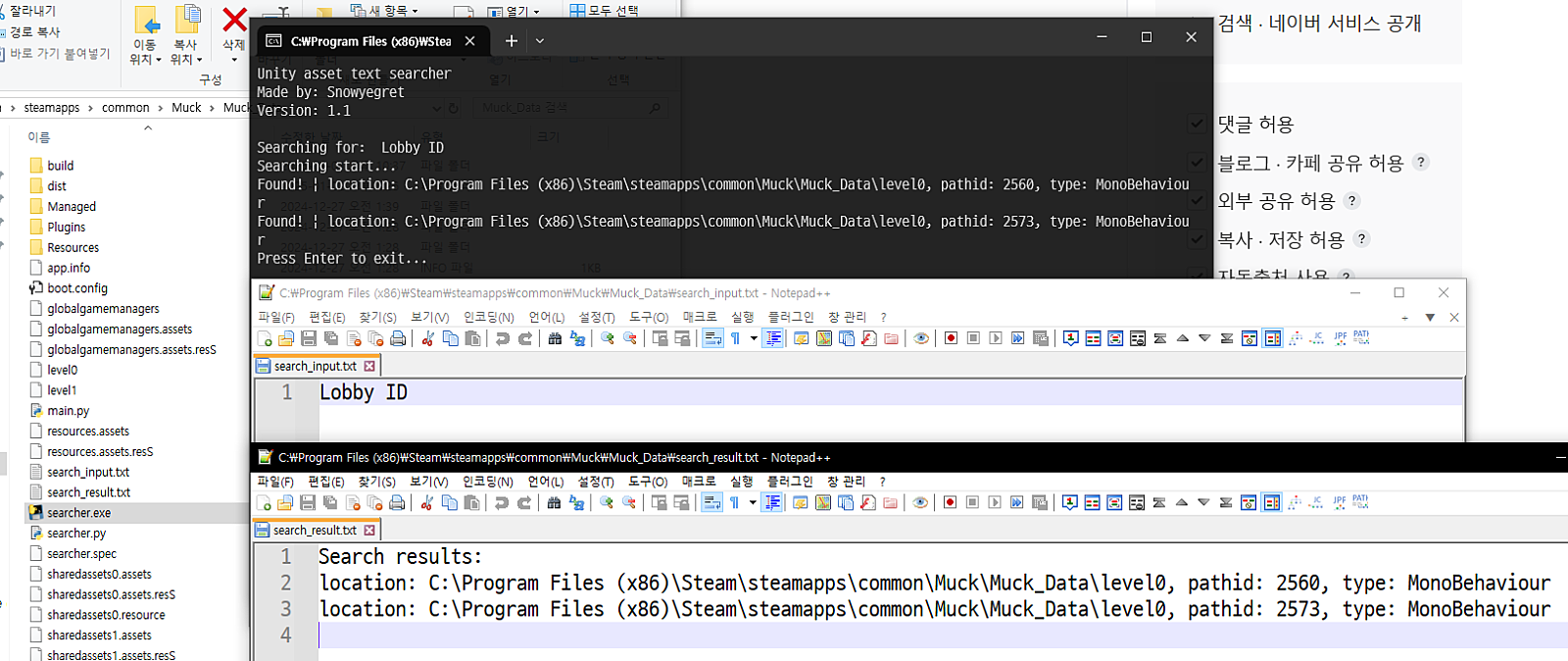
MonoBehaviour, Text, dll에 대부분의 대사가 들어가 있다는 것을 기반으로 작성한 스크립트입니다.
입력하신 대사를 UTF-8로 인코딩하여 검색하므로, Serialize 되어있는 에셋에서도 검색이 가능합니다.
또한, 일반적으로 압축되어 있는 번들파일의 경우에도 직접 열어서 에셋을 하나하나 검색하므로 일반적인 파일 내용물 검색 툴로 검색되지 않는 압축된 번들파일의 경우에도 검색이 가능합니다.
다운로드: (pw: snow)
https://drive.google.com/file/d/1TMluK9jL0FNU4YGLsPsldsgFIJhWo_4a/view?usp=sharing
Unity_search.zip
drive.google.com
코드:
import warnings
from UnityPy.exceptions import UnityVersionFallbackWarning
from UnityPy.helpers import TypeTreeHelper
TypeTreeHelper.read_typetree_boost = False

def custom_showwarning(message, category, filename, lineno, file=None, line=None):
    if issubclass(category, UnityVersionFallbackWarning):
        print(
            "Unity version has stripped. using fallback version... if you want to use custom version or program can't find unity version, run program with -v argument to specify unity version"
        )
    else:
        print(warnings.formatwarning(message, category, filename, lineno, line))


warnings.showwarning = custom_showwarning

import UnityPy
import os
import sys
import clr
import argparse

asset_results = []
assetbundle_results = []
dll_results = []


def sanitize(text: str) -> str:
    return text.replace("\n", "\\n").replace("\r", "\\r").replace("\t", "\\t")


def log_result(collection, message):
    print(message)
    collection.append(message)


def handle_unity_object(obj, file_path, search_bytes, asset_results, assetbundle_results):
    if obj.type.name in ("TextAsset", "MonoBehaviour"):
        data = obj.get_raw_data()

        if hasattr(data, "obj"):
            if search_bytes in data.obj:
                name = obj.peek_name() if obj.type.name == "TextAsset" else obj.read(check_read=False).m_Script.read().m_ClassName
                msg = f"found! | location: {file_path}, pathid: {obj.path_id}, filetype: assetbundle, type: {obj.type.name}, name: {name}"
                log_result(assetbundle_results, msg)
        elif search_bytes in data:
            data_obj = obj.read(check_read=False)
            name = obj.peek_name() if obj.type.name == "TextAsset" else data_obj.m_Script.read().m_ClassName
            msg = f"Found! | location: {file_path}, pathid: {obj.path_id}, filetype: assets, type: {obj.type.name}, name: {name}"
            log_result(asset_results, msg)


def search_asset_file(file_path, search_bytes, asset_results, assetbundle_results, unity_version, default_unity_version):
    if unity_version:
        UnityPy.config.FALLBACK_UNITY_VERSION = unity_version
    elif default_unity_version:
        UnityPy.config.FALLBACK_UNITY_VERSION = default_unity_version

    try:
        env = UnityPy.load(file_path)
        for obj in env.objects:
            handle_unity_object(obj, file_path, search_bytes, asset_results, assetbundle_results)
    except Exception as e:
        print(f"Asset loading error: {file_path}, error: {e}")


def search_dll_file(dll_path, search_str, dll_results):
    try:
        assembly = AssemblyDefinition.ReadAssembly(dll_path)
        search_lower = search_str.lower()

        for type_def in assembly.MainModule.Types:
            all_types = [type_def]

            while all_types:
                current_type = all_types.pop()
                all_types.extend(current_type.NestedTypes)

                for method in current_type.Methods:
                    if not method.HasBody:
                        continue

                    for instr in method.Body.Instructions:
                        if instr.OpCode == OpCodes.Ldstr:
                            current_str = instr.Operand if instr.Operand else ""
                            current_str_lower = sanitize(current_str).lower()

                            if search_lower in current_str_lower:
                                msg = (
                                    f"Found! | File: {os.path.basename(dll_path)}, Class: {type_def.Name}, Method: {method.Name}, Text: {current_str}"
                                )
                                log_result(dll_results, msg)
    except Exception as e:
        pass


def extract_unity_version(version_file):
    try:
        print(f"Extracting Unity version from: {os.path.basename(version_file)}")
        env = UnityPy.load(version_file)
        unity_version = env.objects[0].assets_file.unity_version
        print(f"Extracted Unity version: {unity_version}\n")
        return unity_version
    except Exception as e:
        print(f"Unity version extraction error: {e}")
        return None


def scan_all_files(source_folder, search_bytes, search_string, asset_results, assetbundle_results, dll_results, unity_version):
    dll_files = []
    assets_files = []
    asset_files = []
    default_resources = ""
    default_unity_version = None

    for root, _, files in os.walk(source_folder):
        for file_name in files:
            file_name: str
            full_path = os.path.join(root, file_name)
            if file_name == "unity default resources":
                default_resources = full_path
            elif file_name.endswith(".dll"):
                dll_files.append(full_path)
            elif file_name.endswith(".assets") or file_name.startswith("level") or file_name.endswith(".unity3d"):
                assets_files.append(full_path)
            elif not file_name.endswith(".manifest"):
                asset_files.append(full_path)

    if unity_version is None and default_resources:
        default_unity_version = extract_unity_version(default_resources)

    total_files = len(dll_files) + len(assets_files) +len(asset_files)
    current_file = 1

    for dll_path in dll_files:
        search_dll_file(dll_path, search_string, dll_results)
        os.system(f"title \"[{str(current_file).zfill(6)} / {str(total_files).zfill(6)}] Searching DLL: {dll_path}\"")
        current_file += 1

    for asset_path in assets_files:
        search_asset_file(asset_path, search_bytes, asset_results, assetbundle_results, unity_version, default_unity_version)
        os.system(f"title \"[{str(current_file).zfill(6)} / {str(total_files).zfill(6)}] Searching asset: {asset_path}\"")
        current_file += 1

    for asset_path in asset_files:
        search_asset_file(asset_path, search_bytes, asset_results, assetbundle_results, unity_version, default_unity_version)
        os.system(f"title \"[{str(current_file).zfill(6)} / {str(total_files).zfill(6)}] Searching asset: {asset_path}\"")
        current_file += 1


if __name__ == "__main__":
    parser = argparse.ArgumentParser(description="Search for strings in Unity assets and assetbundles")
    parser.add_argument("-v", "--unity-version", help='Unity version to use for loading assets. Example: -v "2022.3.15f1"', default=None)
    args = parser.parse_args()

    current_directory = os.path.dirname(sys.executable) if getattr(sys, "frozen", False) else os.path.dirname(__file__)

    print("Unity Asset Text Searcher")
    print("Created by: Snowyegret")
    print("Version: 1.5\n")
    print(f"Current directory: {current_directory}")

    input_path = os.path.join(current_directory, "search_input.txt")
    if not os.path.exists(input_path):
        print("search_input.txt file not found")
        print("Please create a search_input.txt file with your search string (utf-8 encoding)")
        input("Press Enter to exit...")
        sys.exit(0)

    with open(input_path, "r", encoding="utf-8") as f:
        search_string = f.read()
        search_bytes = search_string.encode("utf-8")

    print("Loading Mono.Cecil.dll...")
    try:
        dll_path = os.path.join(current_directory, "Mono.Cecil.dll")
        clr.AddReference(dll_path)
        from Mono.Cecil import AssemblyDefinition  # type: ignore
        from Mono.Cecil.Cil import OpCodes  # type: ignore

        print("Mono.Cecil.dll loaded successfully!")
    except Exception as e:
        print(f"Error loading Mono.Cecil.dll: {e}")
        input("Press Enter to exit...")
        sys.exit(0)

    print(f"Search string: {search_string}\n")
    scan_all_files(current_directory, search_bytes, search_string, asset_results, assetbundle_results, dll_results, args.unity_version)
    print("Search completed!")

    with open(os.path.join(current_directory, "search_result.txt"), "w", encoding="utf-8") as f:
        f.write("Search Results:\n\n")
        f.write(f"Search string: {search_string}\n\n")

        if not asset_results and not assetbundle_results and not dll_results:
            f.write("No results found!")

        if asset_results:
            f.write("Assets:\n")
            for result in asset_results:
                f.write(result + "\n")
            f.write("\n")

        if assetbundle_results:
            f.write("Assetbundle:\n")
            for result in assetbundle_results:
                f.write(result + "\n")
            f.write("\n")

        if dll_results:
            f.write("Dll:\n")
            for result in dll_results:
                f.write(result + "\n")

    input("Press Enter to exit...")
# 빌드 명령어
pyinstaller --onefile --console --add-data "C:\Users\USER\AppData\Roaming\Python\Python312\site-packages\UnityPy\resources\uncompressed.tpk;UnityPy/resources" searcher.py

# 안될 시
python -m PyInstaller --onefile --console --add-data "C:\Python313\Lib\site-packages\UnityPy\resources\uncompressed.tpk;UnityPy/resources" searcher.py
.assets, .assetbundle의 경우 UTF-8 텍스트를 DLL의 LDSTR을 순회하며 검색하며(대/소문자 구별 X),
.dll의 경우 UTF-8로 인코딩한 헥스값을 TextAsset, MonoBehaviour를 순회하며 검색하는(대/소문자 구별 O)
프로그램입니다.
search_input.txt에다가 utf-8로 검색할 텍스트를 입력한 다음 저장하고
유니티 게임의 루트 폴더나, _Data 폴더 내에서 프로그램을 실행시키면
cmd창에 출력함과 동시에, search_result.txt에다 결과를 저장해줍니다.
search_input.txt 예시:
Lobby ID
search_result.txt (결과물) 예시:
Search results:

Search string: Lobby ID

Assets:
Found! | location: c:\Program Files (x86)\Steam\steamapps\common\Muck\Muck_Data\level0, pathid: 2560, filetype: assets, type: MonoBehaviour, name: TextMeshProUGUI
Found! | location: c:\Program Files (x86)\Steam\steamapps\common\Muck\Muck_Data\level0, pathid: 2573, filetype: assets, type: MonoBehaviour, name: TextMeshProUGUI

Dll:
Found! | location: c:\Program Files (x86)\Steam\steamapps\common\Muck\Muck_Data\Managed\Assembly-CSharp.dll, filetype: dll, type: LobbyVisuals, method: OpenLobby, string: Lobby ID: (send to friend)<size=90%>\n
Found! | location: c:\Program Files (x86)\Steam\steamapps\common\Muck\Muck_Data\Managed\Assembly-CSharp_original.dll, filetype: dll, type: LobbyVisuals, method: OpenLobby, string: Lobby ID: (send to friend)<size=90%>\n
업데이트 로그:
* 1.2 (25.02.18): pythonnet, mono.cecil을 이용한 dll 내 스트링 검색 지원
* 1.3 (25.03.02): IEnumerator 및 기타 타입의 스트링 검색 지원을 추가
* 1.4 (25.03.16): 번들 검색 버그 수정 및 -v argument 추가 (유니티 버전이 stripped 된 경우 수동 추가)
* 1.5 (25.04.12): .assets파일, level 파일, .unity3d 파일에 대한 우선 처리, 파일이 많을 경우 튕기는 현상 수정
'한글패치 관련 짧은 글들' 카테고리의 다른 글
| UnityPy를 이용한 유니티 게임 MonoBehaviour 특정 텍스트 필드 추출/삽입 (0) | 2025.03.04 |
|---|---|
| IoStore를 사용하며 sig우회가 안되는 언리얼 게임 모드 로딩 방지 우회하기 (6) | 2025.01.20 |
| catalog.json과 catalog.hash가 있는 유니티 게임의 수정법 (0) | 2024.12.18 |
| 번역을 위한 유니티 Il2cpp 게임의 복호화/암호화 (0) | 2024.12.18 |
| 유니티 VideoClip 에셋 교체하기 (3) | 2023.11.18 |